
Project git
What changed in the working tree as a whole, and how to commit it. This is the end of a scenario Clauder runs from the very beginning: started a chat from the phone → the agent did the work → looked at the diff → committed.
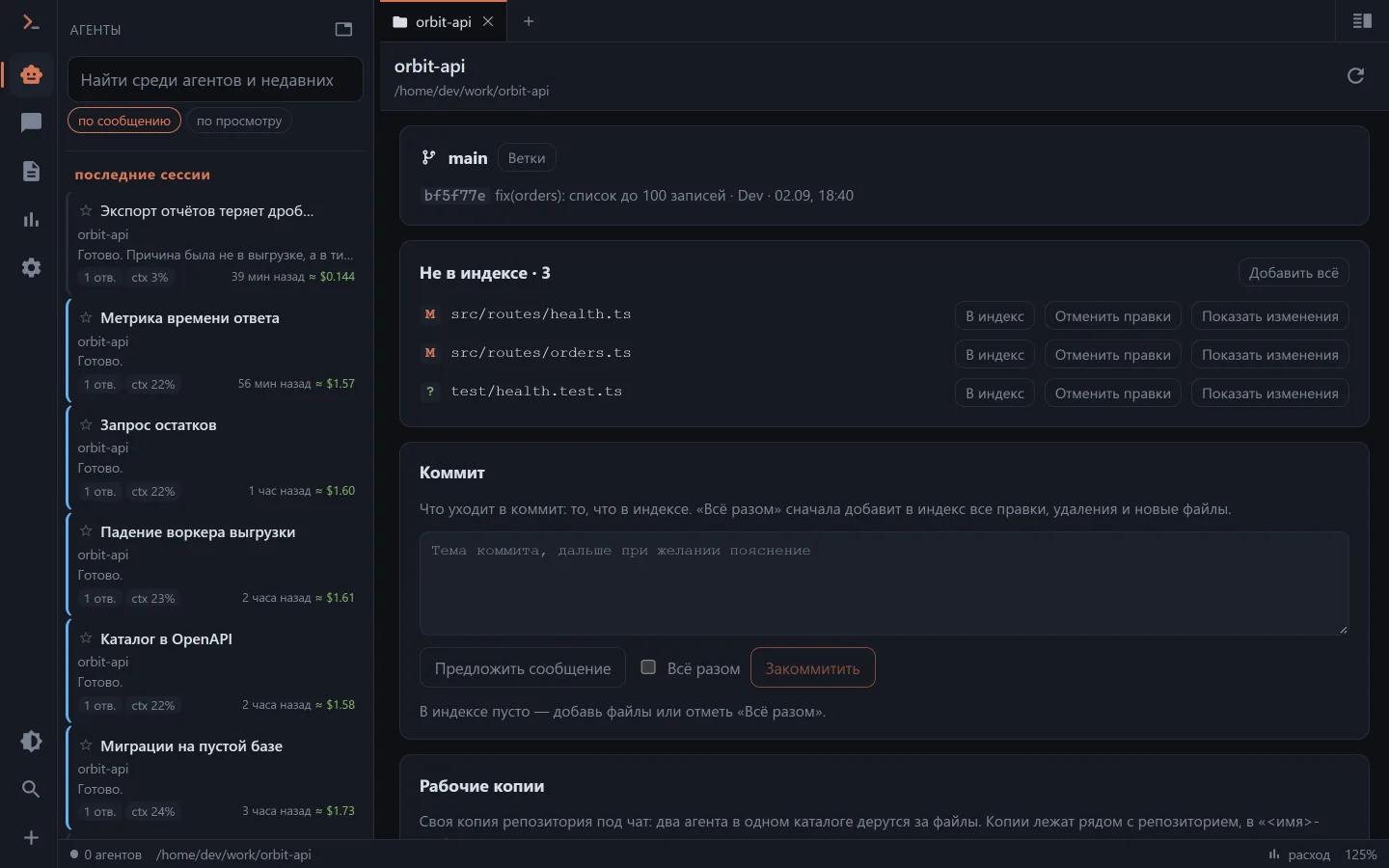
How to get here
- the chat menu, the "Project git" item — next to "Project files";
- the branch icon in the file browser header, if the directory is under git;
- the address
/git?cwd=<directory>— any directory of the project will do, the server finds the repository root itself.
The VS Code panel has no such screen: the editor has its own Source Control tab, and a second road to the same place next to it would be redundant.
What you see
At the top — the branch with ↑/↓ relative to upstream and the last commit; the "Branches" button opens picking an existing one and creating a new one.
Below are the groups, as in git status:
- conflicts — first: neither a commit nor a branch switch will go through with them;
- the index;
- not in the index, together with new files.
One file can stand in two groups — an edit in the index and another one on top of it in the tree. That is how every git client splits changes, and it is not needless strictness: a chunk added to the index and an edit on top of it are two different things.
For each file: a status letter, the path (a link into the file browser), "stage" / "unstage", "discard changes" with a confirmation, and "show changes" — the diff unfolds under the file and is recalculated after any action on the index.
The commit
A message field, "Suggest a message", an "All at once" checkbox and a button. The button is dimmed while the index is empty (without the checkbox), there are conflicts or the message is empty — the caption below says which of those it is.
"Suggest a message" hands the model the diff of the index (or of the whole tree under "All at once") and the subjects of the last eight commits — so that it lands in the repository's language and form. One question with no tools, and the answer is put into the field; nobody stops you from editing it.
The repository's hooks are not disabled. If tests run before a commit, they will run the same way from the phone — which is why a commit gets a two-minute timeout against twenty seconds for everything else.
Git's complaints arrive as they are: "nothing to commit", "Please tell me who you are", a conflict on a branch switch. These are the same texts you see in the terminal, and there is no point translating them.
What can lose work
The only such action is "discard changes": tracked files get git checkout -- …, new ones git clean -f -- …. Paths are mandatory, and there is deliberately no "discard everything" button here: for that there is rolling back to a message in the chat, and that one can bring things back. Clients ask again before every file.
Working copies (worktrees)
Two agents in one directory fight over files. The "Chat in a new worktree…" button in the new-chat form asks for a branch name, creates a copy and swaps the chat's directory for it — the chat starts there straight away. If the branch exists it is used, if not it is created from the current HEAD.
The copies live next to the repository: /var/www/proj → /var/www/proj-worktrees/feature-x. Inside the tree git would count them as untracked junk.
Cleaning up is the "Working copies" section on the same screen. Only a copy from the list can be removed, and not the main one; with uncommitted changes git refuses, and the client asks a second time — this time about losing the changes. Two confirmations are deliberate: this is the only thing on the screen that erases a directory. The branch survives the cleanup.
What is not here
- Push and pull. That is already about a remote repository and its keys, and Clauder's access key is not a key to someone else's server.
- Hunk staging: it is unreadable on a phone, and on a desktop there is an editor for that.
- Merges and conflict resolution. A conflict is shown, but it is fixed by the agent in the chat or by a human in an editor.
CRLF files in docker
Git sees the tree as it is mounted: files with CRLF that a Windows git considers clean are shown as entirely changed by the one in the container. That is a property of the mount, not of this panel.