
Chat with the agent
The server runs a session through @anthropic-ai/claude-agent-sdk, authenticating with the OAuth token from ~/.claude. The transcript goes into an ordinary ~/.claude/projects/**/*.jsonl, so the chat shows up in the common list right away — and in claude --resume in the terminal too.
Starting and continuing
- "💬 New chat" — pick a directory (or take one from the recent list), a model and an effort level, send the first message.
- "+ New project" in the project list — the same, but starting with a folder that has no sessions yet; the folder can be created on the spot.
- "💬 Continue in chat" on a session page —
resumeby its id.
Reply mode
The same block appears in the new-chat form and above a live composer: the model with an explanation, a row of effort levels and two toggles — ⚡ ultracode and workflow (three-state: "on / off / let the plan decide").
Model, effort and ultracode change on the fly. Workflow requires restarting the session: the CLI assembles its tool set at start, and a live session can't be switched.
The composer
You can attach images to a message — from the gallery, from the camera or pasted from the clipboard; they are compressed on the client. Unfinished text (and the images attached to it) is kept as a draft for every chat and every directory in the new-chat form — you can wander off for a folder and come back without losses.
A sent message can be taken back. A message queued behind the current reply is removed with a cross and returned to the field; a long press copies text, a link or a code block.
A command instead of a message. A line starting with ! doesn't go to the model: it is run by the shell in this chat's directory. !git status, !npm test, !tail -50 log — the same things you would normally open the terminal for, but without leaving the conversation and without spending an agent turn on it. The output lands in the feed as a separate record.
@ completes file paths. Type @ and the start of a name, and a list of files from the chat's folder appears above the field. The server searches the whole tree and honours .gitignore, so node_modules and build output stay out of the list. A file goes into the text as @path, while a chosen directory opens further — that is how you walk down the tree without typing names. A path with a space is sent in quotes, the way the CLI understands it. The model receives plain text: it reads the file at that path itself. With a keyboard the arrow keys move through the list and Tab or Enter picks — on the web and on Android alike; on a phone without one you pick with a tap.
A code block is copied by a button. The icon in the fence's top-right corner takes the whole block. Copying works over a local network without https too: in an insecure context the browser refuses the page the clipboard, so a fallback path is used.
The model's questions
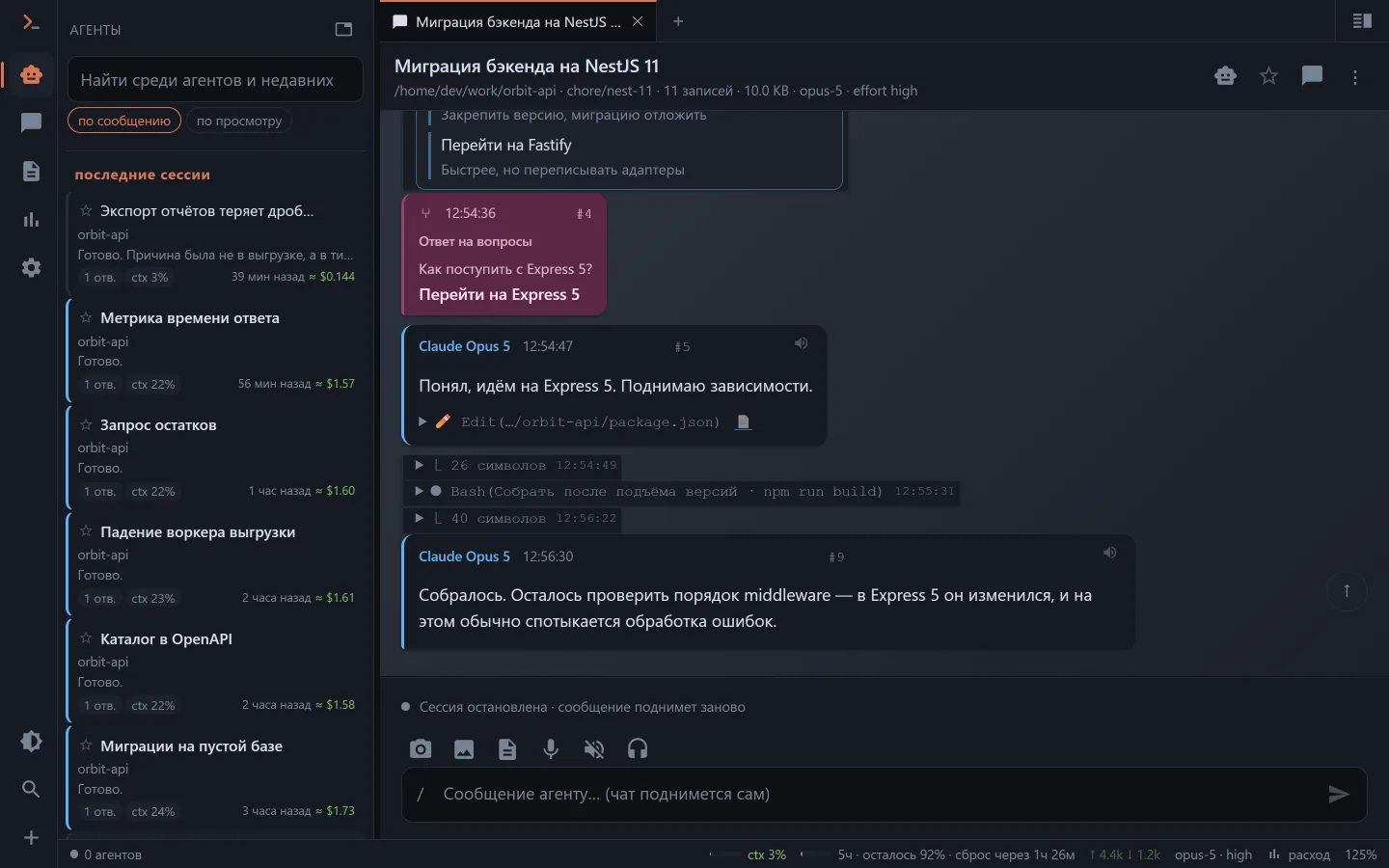
Questions (AskUserQuestion) are shown as a card with options. A hanging question survives a page reload and arrives on every device at once — answer from the phone and the card in the browser goes out.
A question from a foreign session — one run by claude in the terminal — can be intercepted and answered from Clauder too. That needs hooks.
A password as a card, not as a message
When the agent needs a password, a token or a key, it raises a card with a password field above the composer, and the turn stops until you answer. The value goes to the server and is substituted into the command there; the conversation, the transcript and the model's context keep only the secret's name. In detail — Secrets and safe mode.
Slash commands
The composer has commands of its own:
| Command | What it does |
|---|---|
/model, /effort, /permissions, /ultracode, /workflows | change the live session's settings |
/context, /cost | show its state |
/btw | asks a side question in the same conversation |
/continue | writes "Continue" and sends it immediately |
/agents, /chats, /files, /search | navigate the interface |
/login, /logout | sign in to Claude and out: a window with an OAuth link and a field for the code |
An unknown name doesn't count as a command and goes out as a message — that is how the CLI's own commands (/compact, /init, your project ones) pass through the composer.
The context window
The spend line under the composer shows the window's fill as a percentage with a bar and three colour steps. It is counted against the usable part of the window (0.9 of the nominal): the rest is held by the CLI for auto-compaction and its own reply.
A tap unfolds a fill-over-time chart with compaction marks and a heading like "Context window: 45k of 200k · 23% used".
What else is alive
The line above the composer speaks about everything alive at once: "⤷ 2 subagents · ⚙ 3 background tasks running — take a look". A subagent writes into its own file and a child chat lives as a separate session — they barely show up in the feed, and the line leads to the agents screen.
Permission modes
In the default, plan and acceptEdits modes a card "The agent wants to call a tool" appears above the composer with the buttons "Allow", "Always for this tool" and "Refuse"; the reply waits for your decision. The mode is changed in the settings and with the /permissions command.
The default is bypassPermissions — tools run without confirmations. What that means in practice is written in Security.
A foreign session listens too
A chat opened in the terminal or by another Clauder accepts a message (it arrives through a hook), shows in its header what it is busy with right now ("⚙ Bash(…)"), and can be ended with "End session" under "⋮". No second process is started on it.
A work queue for one directory
Several long jobs in one folder edit the same files and trip over each other. Their order is set from the chat menu, the "Work queue" item: the list of this directory's jobs, reordering, "run now" and "remove".
Only one runs at a time — the queue holder; the rest are frozen until it reports done. What you write into a frozen chat is neither lost nor squeezed into the middle of someone else's turn: the message waits for its turn, and a "⏸ waiting for its turn" plate with a counter of what has piled up stands above the composer. The queue lives in the database, so a server restart doesn't lose it.
Taking a chat away or showing it
As a file. "Download as Markdown" in the chat menu ("Share as Markdown" on Android): a header with the title, directory and model, then the conversation — "You" and "Agent", with tool calls as a line under the reply. Command output and subagents don't go into the file; thinking only with the endpoint's flag (?thinking=1). The file is built by the server, so it is the same in every client.
As a live link. "Share a link" in the same menu issues a read-only link to this one chat — no access key and none of the rest of Clauder. While the link is alive, the guest sees the chat keep going. What they can and cannot see — in Access keys.
Places where the behaviour is not obvious
These are not bugs but properties of the SDK — still, they are worth knowing.
resume often starts a new file. The SDK doesn't guarantee continuing in the same transcript. Clients watch the actual sessionId of the reply and move to the new session themselves — otherwise the screen would sit on the old file and look frozen.
A sent message doesn't appear in the file at once. While the current reply is running it sits in the SDK's queue. Clients draw it themselves (a pending bubble) and remove it once the same line shows up in the transcript.
Agent sessions live in memory. Restarting the api (including a hot-reload after editing api/src) wipes them, and the old runId returns 404. An interrupted reply is resent by the api itself, and an open screen brings the session back up. The only thing that doesn't come back is an answer to a hanging question: the new process knows nothing about it.
A failed API request is visible. While the CLI retries it, a countdown runs in the composer ("API error (service overloaded, HTTP 529) — retry 2 of 8 in 8 s"), and the line is clickable: a tap retries immediately. A reply cut off by a plan limit is not resent: until the window resets, a retry returns the same error.
Agent settings
The AGENT_* variables in .env (or the "Agent" section in the app window): model, permission mode, allowed roots for cwd, the cap on simultaneous sessions, the idle time before auto-closing. The full list is in the variables reference.